Discovery Engagement of
BC Federation of Students (BCFS) seeks a long-term partner to build and support their student discount program app (IOS, Android, Admin Backend) and has expressed an interest to hire FreshWorks Studio. To show our capabilities, spark a conversation and win the contract, designer was supporting the discovery engagement by competitor research and conceptual mockups.
20 hours was allocated for design support and the following epic user stories were chosen for design:
As a student I can view a list of partner businesses which offer discounts.
As a student I can select a business to view details on their discount(s).
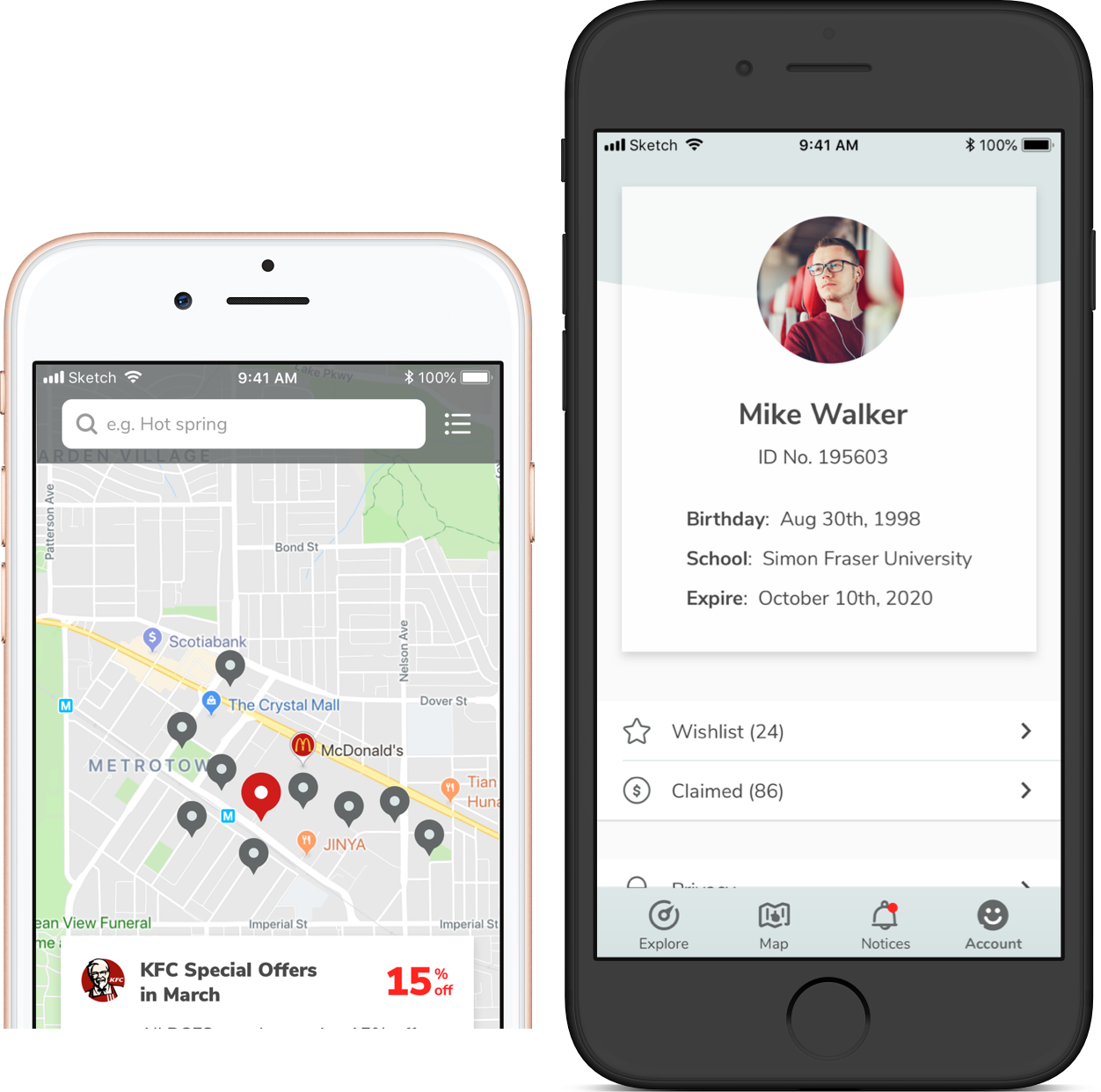
As a student I can view the locations of partner businesses on a map.
As a member student I can view my virtual discount card.

Target Audience & Design Direction
The audience are students in college and university, teenagers and early 20s. They’re modern, tech-smart, fun, trendy, active, and open-minded.
The design directions were condensed as two major options: Minimalist Cool vs Vibrant Bright. They both represent the natures of being young: Minimalist Cool is more modern, technological and trendy, whereas Vibrant Bright expresses the openness and enthusiam. In terms of app design however, Minimalist Cool is easier to deliver a cleaner interface and simpler experience without much noise. Besides, it could accomodate colorful branding and promotions better than Vibrant Bright. According to recent research, Blue is the most color choice of young people regardless of gender, so the app is using blue as the primary color, which also fits the tone of ‘Cool’.
Competitor Research and Evaluation
Two competitor apps, SPC and ISIC, were investigated. They both have many UX issues, and the visual style is old-fashioned - absolutely not appealling to young audience. The section below diagnosed the screens inside these two apps.
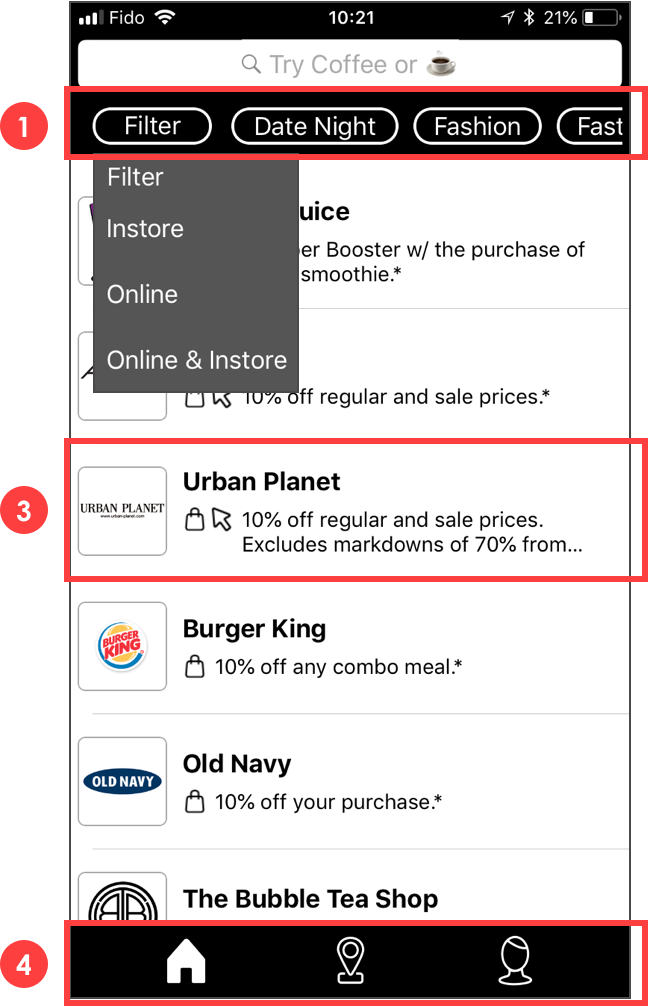
• Home / Discounts / Explore page: As a student I can view a list of partner businesses which offer discounts.

1 & 2. The filter system is cluttered with poor visibility, recognizability, and navigation - it’s effort-taking to find out and recall the right attributes. Besides, the tag ‘filter’ is a drop-down, containing a few mutually-exclusive options, whereas other tags (date night, fashion) are more like ‘categories’. These tags represent different perspectives of the businesses (location vs category) and react differently once interacted with (dropdown vs buttons) , but they do look identical.
3. Poor informational and promotional design. The logo takes much space but has bad recognizability. Promotion-wise, nothing in the row grabs users’ attention.
4. The right-most icon in the tab bar looks confusing - by guessing the users may figure out it means ‘account’ or ‘profile’. But it looks unconventional and doesn’t have caption, which may add more efforts to recognize.

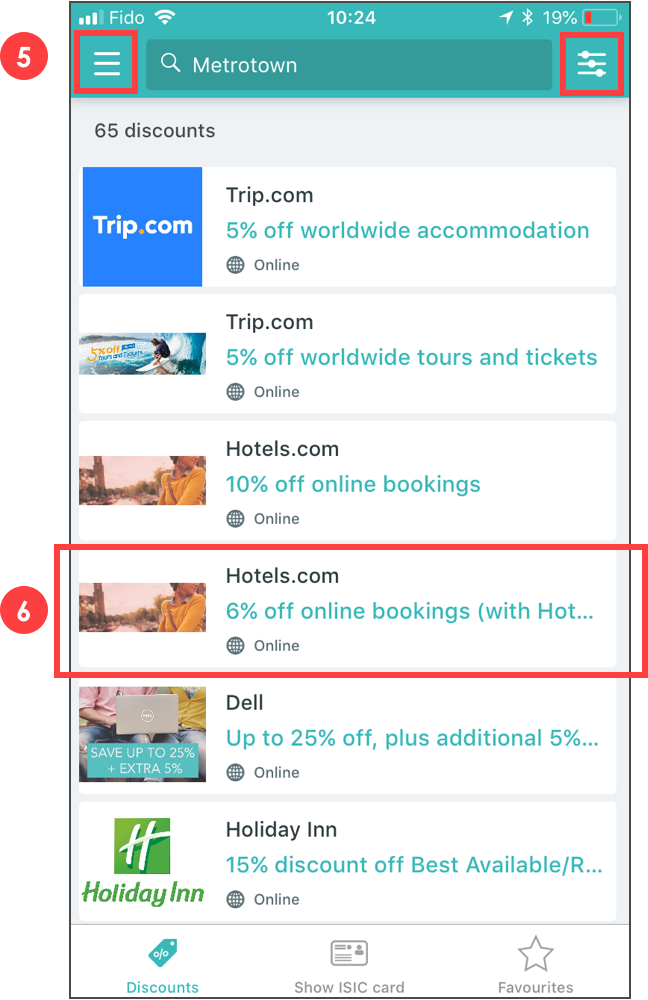
5. The menu icon and filter icon look alike. Besides, menu button isn’t associated with searching and navigation here, it should be somewhere else to make the architecture more logical.
6. Poor informational and promotional design. The photo adds little value to the promotion and looks squashed and truncated. The design is also inconsistent due to different branding choices (logos vs photos).
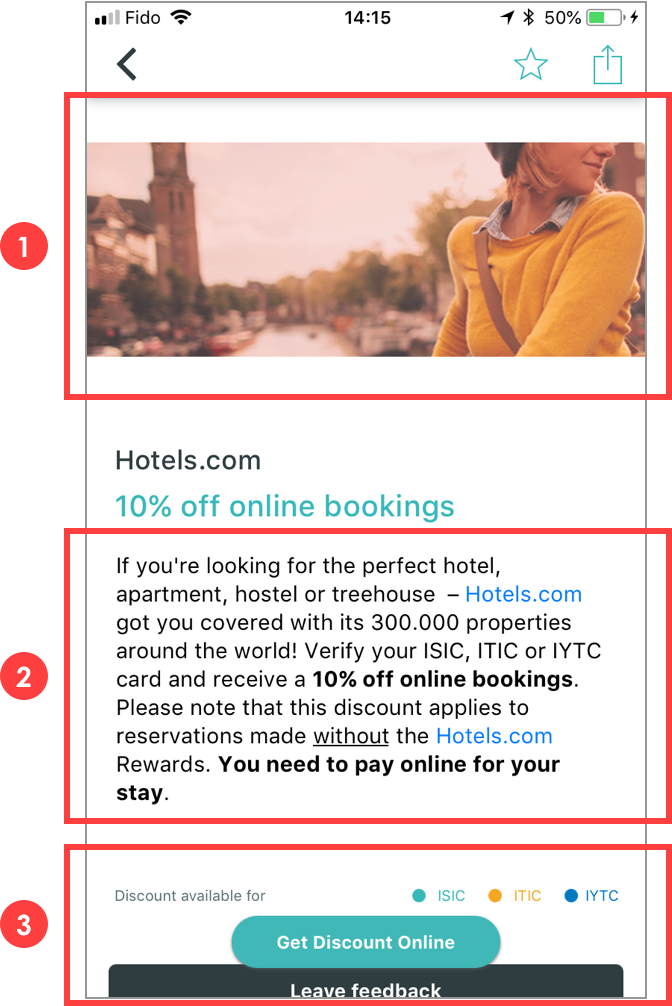
• Promotion Details Page: As a student I can select a business to view details on their discount(s).

1. Cover photo is space-consuming but provides little value, also adding extra requirement to the business owner - uploading a properly-sized, promotion-worthy cover.
2. Information is chunky but not properly formatted. There’re shoutouts like hyperlinks, bold text, underlined text scattering in the paragraph, distracting the reading experience.
3. Call-to-actions are poorly positioned and sized.
My Design
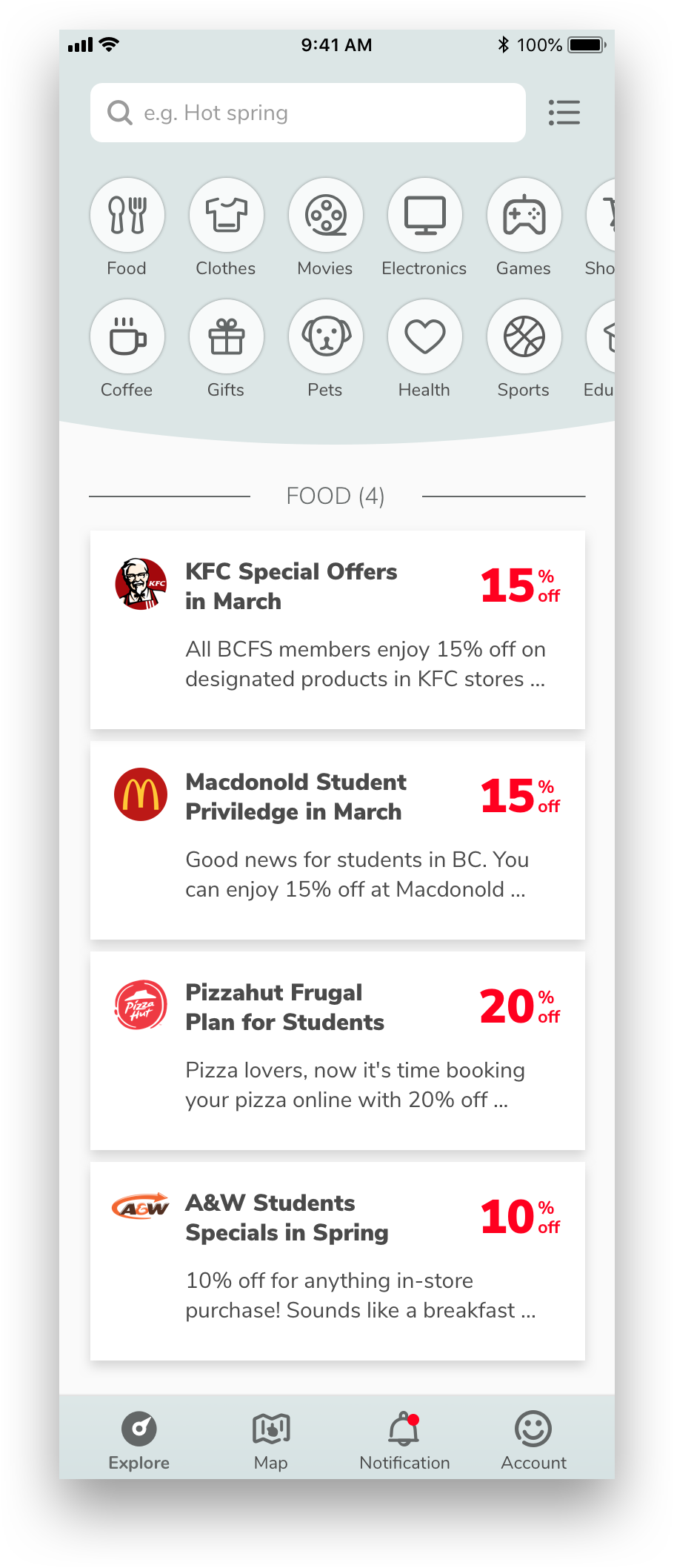
Easier navigation with explicit and visually-pleasant categories (support multi-selection).
Better informational and promotional design - balanced layout of partner branding and promo info.
Better tab bar design with logical icons and captions.
Cleaner and younger visual style in general - minimalist but engaging.

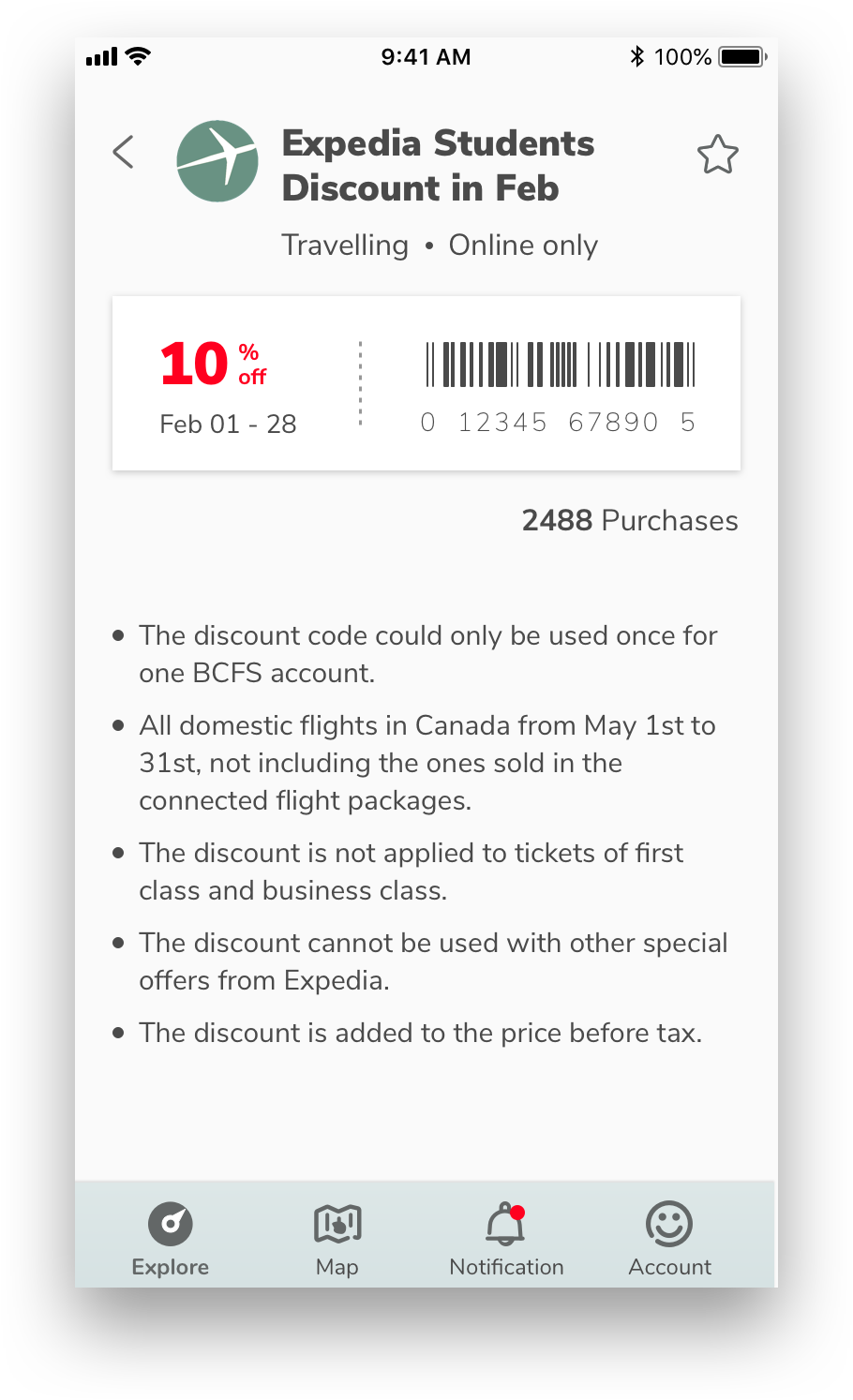
On the same page, the information has a clear hierarchy and proper format. As a result, no space is wasted and the page ends up providing more info to the customers (category, location, purchases, etc).

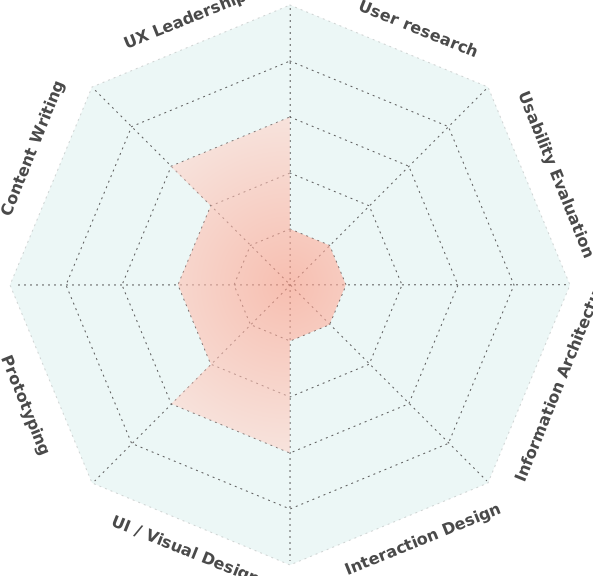
As the sole designer in the team, I was in charge of anything relevant to design. The chart on the right roughly presents what I’ve been working on throughout the project. In general, I touchbased on all areas a bit, but there were a few which took more efforts.
UX Leadership: I worked closely with project manager, business analyst, and sales/operations to ensure the deliverables are impressive to the potential client and push forward the progress.
1. Decision-making: During the 20-hour design time, I need to digest the user stories and work straight to the high-fidelity design. This means I have to make decisions faster and move on without wireframing, testing and iterating.
2. Presenting: To win the client’s trust, how to present the design is one of the key factors. I polished the powerpoint the sales made and showcased the design by contrasting the competitor apps in the market and the mockups we made. In the end, the client was happy about our competencies and confirmed the partnership with us.
UI/Visual Design: The biggest win of our design compared to the competitors is better UI/Visual Design practices across the board. The primary color, the watered-down turqoise, is liked by majority of target audience - it’s modern, clean and elegant, a perfect base color, never clashing with various colorful promotional elements. Equally important, the icons, compared to plain text, are much more approachable and aesthetic, adding more fun and vitality to the interface.
Tools
Wireframe, UI design
Clickable Prototype
Photo Editing
Interaction